
Household
Set up the tax profile once, review current account values and allocation drift, monitor live strategies, then use plan and run for reproducible tax-aware backtests. Running the allocator requires Pro.
On this page
Household workflow
Save the household setup
Add members and accounts, choose a target, and set the date of your current holdings. Review the visible tax assumptions before using tax estimates.
Review household
Use Household for account values, taxable share, allocation drift, warnings, and saved live strategies.
Check live strategies
A live strategy with linked household and holdings shows the current signal state and account-level pending trades.
Review tax opportunities
Use Tax opportunities to see harvestable losses, gain-harvest candidates, embedded gains, and wash-sale risk from the latest snapshot. The diagnostic is free. CSV exports are Pro.
Run the allocator
Use Plan and run when you need a reproducible tax-aware backtest and detailed trade plan.
Turn the household setup into a tax-aware run
Setup is free and reusable. Pro adds the Tax-Aware Allocator run that turns saved accounts, lots, and tax assumptions into a reproducible trade and tax simulation.
Import holdings
Save your household accounts and target first. The setup panel then offers CSV import next to the manual holdings editor.
Import replaces current holdings across the household. Accounts missing from the CSV become empty, and the CSV cannot include option positions. Review these changes before saving.
- Download the CSV template from the import panel, or choose your broker export format.
- Replace the example row with your own lots. Include every household account that holds investments.
- Set the snapshot date to the date those balances describe. Acquisition dates must be on or before that date.
- Choose the CSV and select Review import.
- Match each CSV account name to a saved household account. Review the parsed lots and fix any errors.
- Review the previous and incoming lot counts for every account, then select Save reviewed holdings.
The template columns are account, symbol, shares, cost basis per share, and acquisition date. Use dates in YYYY-MM-DD format. Each row represents one lot. Replace every example value before importing.
The review requires separate confirmation for each previously funded account that becomes empty. It also lists option positions the import will remove and asks for confirmation. Use the manual editor to retain those positions.
Previous snapshots remain in history. If another tab changes your household or holdings, select Review latest snapshot. Your CSV and account choices remain available, and you must confirm the updated review before saving. If a saved account disappears, select Reset account choices and review to match the CSV again.
Choose dates and targets deliberately
The current holdings snapshot date describes the balances you enter in setup. It is separate from the historical start and end dates in the allocator. A historical run continues to use its selected start date for starting holdings.
A new household starts without a target allocation. Enter your desired weights, which must total 100%, and confirm the target before saving. The target describes your policy. It does not recommend trades.
Read monitor status
Awaiting first check means you saved a monitor but it has no completed evaluation. Unavailable means the latest status did not load. Neither state means the household is clear.
Monitor rows show the last completed check and data date when available. Drift settings state which absolute or relative bands apply. Absolute bands use percentage points. Relative bands use a percentage of each asset’s target weight.
The Household page shows signals linked to that household. Unlinked strategies remain available from View unlinked strategies in Monitors.
One setup, several tools
The household surfaces share one saved setup. Set up the household once. Each tool reads the same accounts, tax context, and holdings snapshot.
| Surface | What It Does | Access |
|---|---|---|
| Household setup | One-time setup: filing status, tax context, accounts, members, and holdings. Tax-aware tools across the platform default to these values. | Free, signed in |
| Household | Read-only overview: account values, allocation drift, warnings, live strategies, and monitor panels. | Free, signed in |
| Household Tax Opportunities | Diagnostic of harvestable losses, gain-harvest candidates, bracket room, and wash-sale risk from the latest snapshot. | Free when signed in. CSV exports are Pro. |
| Tax-Aware Allocator | Reproducible multi-account tax-aware backtest with per-account trade instructions and annual tax bills. | Pro |
| Asset-Location Backtester | Compares naive and tax-optimal account placement. See its documentation. | Pro |
Household walkthrough
Read the portfolio overview first
The Household overview uses the latest saved household and holdings snapshot.
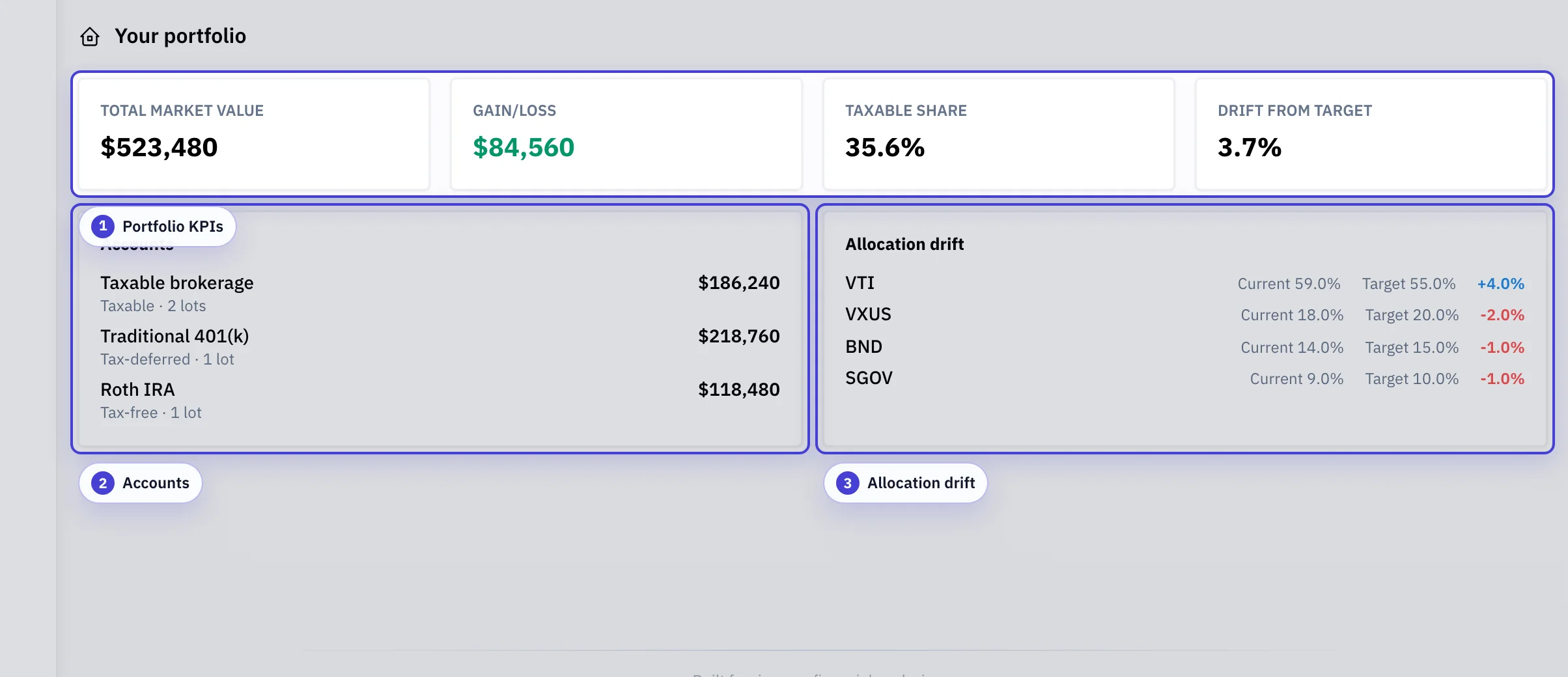
Portfolio KPIs: Household computes total value, gain/loss, taxable share, and total drift from the current holdings snapshot.
Accounts: Each account keeps its tax character visible so taxable and tax-advantaged assets are not blended together.
Allocation drift: Current and target weights are shown side by side, with signed drift for each asset.
Monitor live strategies from household
Live strategies pinned from Workspace appear in Household when you link them to the saved household and holdings snapshot.
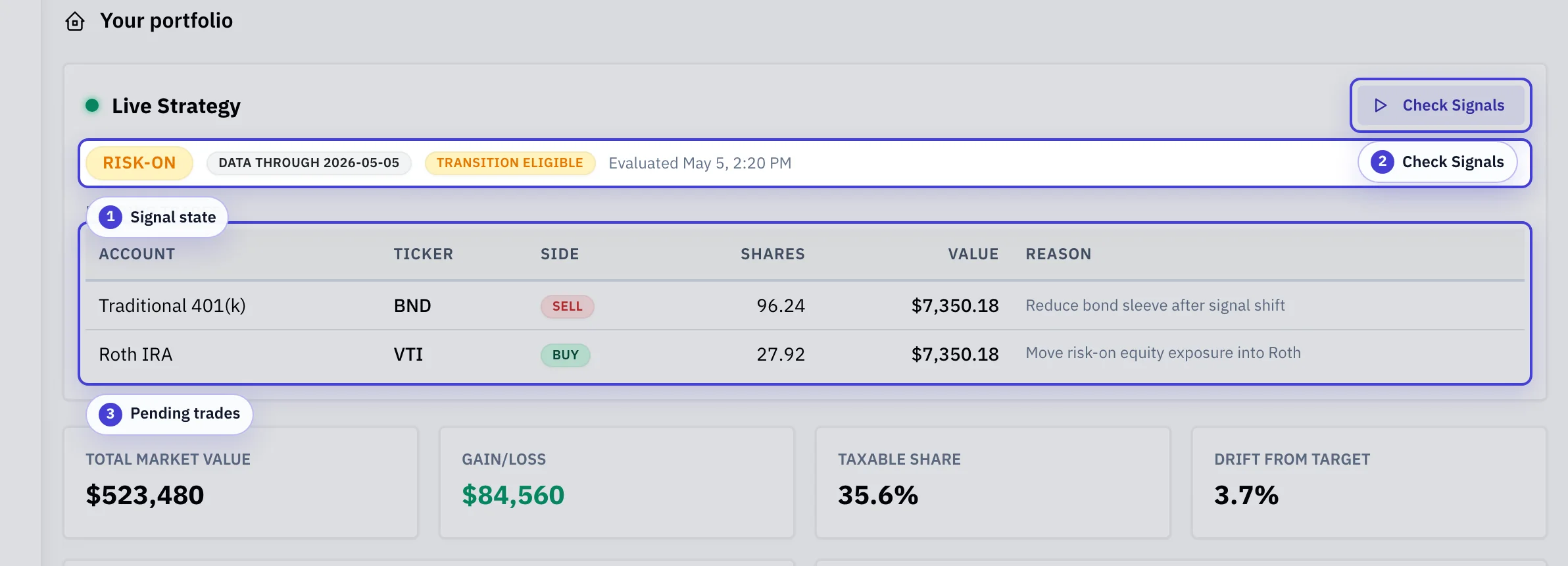
Signal state: Shows the active state, market-data date, transition eligibility, and latest evaluation time.
Check signals: Runs an on-demand signal evaluation against the latest available market data.
Pending trades: Account-level guidance lists ticker, side, shares, dollar value, and routing reason.
Features
- Household with compact KPIs, account values, allocation drift, tax-profile warnings, and inline tax profile editing
- Live strategy monitoring with signal status, data-through dates, transition eligibility, and account-level pending trades when you link a household and holdings snapshot
- Model taxable, traditional, Roth, and HSA accounts as a single filing unit with per-account cost basis tracking
- Tax-aware backtesting across accounts with per-lot accounting, realized-gain tracking, and annual tax bills
- Cross-account tax-loss-harvesting candidates with wash-sale risk assessment and possible substitutes
- Asset-location comparisons that rank tickers by modeled tax efficiency across account types
- Required minimum distribution (RMD) shortfall detection for traditional accounts with owner birth-year metadata
- Implementation constraints including rebalance frequency and deviation thresholds, an account preference order, and a taxable drift budget
- Contribution schedule and withdrawal priority per account
- One saved tax profile per user, reusable across backtest runs and revisions (each save creates a new immutable version)
When to use it
- You want to see how a portfolio of accounts (taxable + Roth + traditional + HSA) would have performed together under a shared target allocation.
- You want per-account trade instructions that respect cost basis, wash-sale rules, and account tax character, not a single blended portfolio result.
- You want to quantify the benefit of better asset location (holding bonds in tax-deferred, equities in taxable and Roth) relative to an ignore-location baseline.
- You want to surface cross-account tax-loss-harvesting opportunities without violating the wash-sale rule across your IRAs.
How it works
The workflow separates four persistent records. The tax profile holds accounts, tax context, target allocation, and constraints. The holdings snapshot holds the current per-account lots. Each saved analysis holds the immutable references used for its backtest. The fourth record is the live strategy selections pinned from Workspace.
Each user owns exactly one tax profile. When you edit and save, the workflow records a new immutable version. The household overview uses the latest saved tax profile and holdings snapshot. Running the allocator persists the current form as a new version before dispatching the simulation. Trade instructions, tax bills, and holdings paths therefore always correspond to a resolvable pair of workspace references.
Live strategy monitoring evaluates saved Strategy Builder definitions against current market data. When you link the live selection to the household and holdings snapshot, account-level pending trades appear in household instead of only target weights.
Account types and tax treatment
| Account | Treatment |
|---|---|
| Taxable brokerage | Per-lot cost basis, realized capital gains, wash-sale tracking, dividend income taxed at the configured rate, and opt-in tax-loss harvesting with substitute assets. |
| Traditional (IRA / 401(k)) | Pre-tax balance. The model taxes withdrawals at the configured ordinary-income rate. It projects RMDs from the owner's birth year. An alert identifies a shortfall. |
| Roth (IRA / 401(k)) | Tax-free growth. Wash-sale rules still apply across Roth and taxable because substantially-identical purchases in a Roth can still forfeit basis bumps in taxable. |
| HSA | Treated as tax-free for modeling purposes. Contributions and withdrawals follow the per-account schedule you supply. |
Household Tax Opportunities
Household Tax Opportunities is a read-only diagnostic over the latest saved holdings snapshot. It surfaces harvestable losses, gain-harvest candidates, embedded gains, and wash-sale risk without running a backtest, and it does not count against any compute quota.
- Snapshot-date anchoring: every calculation uses the holdings snapshot date for holding periods, the wash-sale window, and price lookups. The same snapshot reproduces the report. Capture a new snapshot to refresh it.
- Loss threshold on cost basis: the tax-loss-harvesting percent threshold divides each lot's loss by its cost basis, not its market value. A lot qualifies when the loss is a large enough share of what you paid for it.
- Bracket room and NIIT distance: computed only when the tax profile's federal bracket mode is current-2026 or historical. The custom and flat modes have no statutory bracket edges, so those summary fields stay empty and the report notes why. Loss and gain candidates still appear.
- Review workflow: you can watch, dismiss, snooze until a date, or mark each row reviewed. These decisions persist across visits and new snapshots, so the list tracks what you have already handled.
- Free vs Pro: the diagnostic, the review workflow, and history are free for signed-in users. Per-section CSV exports and the review bundle are Pro.
- Monitoring: the Monitor tax-loss button creates a scheduled monitor that emails you when the opportunity set materially changes. See the Monitors guide.
Tax-Aware Allocator: rebalancing and routing
Rebalancing runs at the requested frequency (monthly, quarterly, yearly) or whenever the target weight deviates past your threshold. The engine prefers tax-advantaged accounts when buying and taxable last when selling, subject to the account preference order you supply. A taxable drift budget caps how far the taxable-only slice can deviate before forced rebalancing triggers realized gains.
How to get useful results
- Set up the tax profile once (accounts, tax context, and target allocation) and save it. Subsequent backtests reuse the exact shape.
- Import real per-account holdings via the CSV editor instead of estimating. Per-lot cost basis is what makes the tax-aware output meaningful.
- Enable tax-loss harvesting on taxable accounts that hold correlated substitutes. The engine emits hints, not executed trades, so you can review before acting.
- Watch the dividend-degradation alert. Missing dividend history understates tax drag. Backfill or replace the ticker for a cleaner comparison.
Tax-Aware Allocator: read the outputs
- Aggregate pre-tax / after-tax values: the portfolio's trajectory with and without unrealized-tax drag, aligned to the same date index.
- Per-account timeseries: same trajectories broken out by account so you can see how the rebalancer loaded each sleeve.
- Trade instructions: chronological list of buys and sells with account, asset, shares, dollars, reason, and realized gain (for sells).
- Annual tax bills: per-year federal and state tax liability, including short- and long-term capital gains, dividend income, and NIIT.
- Asset location scenario notes: each ticker's efficiency class and the preferred account type, with a short rationale.
- Tax-loss-harvest hints: candidate losses, accounts with substantially identical positions, the wash-risk level (low / medium / high), a possible substitute, and a confidence note.
- Final holdings: end-of-run per-account lots, mark-to-market value, cost basis, and unrealized gain.
- RMD shortfall: if an owner's required distribution was not met during the backtest window, the dollar shortfall (and the 25% excise estimate).
- Dividend degradation alert: the list of tickers with degraded or unavailable dividend history, so you know which results depend on a zero-income substitution.
Common mistakes
- Entering the same holdings across multiple accounts without considering asset location. Compare the modeled tax effect of other placements.
- Running a backtest with stale holdings. Press New snapshot to capture the current state before you test a new scenario. The next run then does not update the prior snapshot in place.
- Treating tax-loss-harvest hints as safe trades. The wash-risk level accounts for identical positions across accounts. You still need to confirm substitutions are not substantially identical to other holdings in your real accounts.
- Ignoring the RMD shortfall alert. Total tax paid includes the estimated 25% excise tax, and the alert shows which owner/account missed a required distribution.
Tax-Aware Allocator: modeling assumptions
- Prices use unadjusted close series. The engine books dividend income separately, so reinvested dividends do not get double-counted.
- The engine treats missing dividend data as zero income for the affected tickers and surfaces it as a degraded-ticker warning.
- State tax modeling uses a flat rate for the configured resident state. It does not model progressive state brackets.
- Federal bracket mode can be current-2026, flat, custom, or historical. Pick the mode that matches the question you are asking.
- TLH hints are advisory. The engine does not execute substitutions because wash-sale avoidance depends on facts that it cannot see.
- The snapshot captured at run time must cover every account in the tax profile. The run rejects missing accounts instead of silently simulating them from empty portfolios.
NIIT, MAGI, and foreign income
The optional adjusted gross income field feeds the NIIT MAGI base. When you set Form 1040 AGI, the engine computes NIIT MAGI from that AGI plus excluded foreign income after allocable deductions.
For NIIT, Form 8960 increases AGI by the amount of excluded foreign income that exceeds deductions allocable to it. The adjustment cannot reduce NIIT MAGI below AGI.
When AGI is not provided, tax opportunities omits NIIT MAGI, NIIT distance, and gain-row NIIT flags.